Payload Dumper GUI: Extract OTA Payloads
Payload Dumper GUI is a free system tool by rhythmcache that lets you extract Android OTA payloads from local files or remote HTTP URLs.
Payload Dumper GUI is 16 MB and requires Android 7.0 or higher; the app is free with no ads or in-app purchases. It supports payload.bin and OTA ZIP files, and can extract specific partitions directly from remote HTTP URLs. This tool suits users who need to inspect or extract Android OTA payloads, though it does not support multi-extent or differential OTAs.
Screen gallery
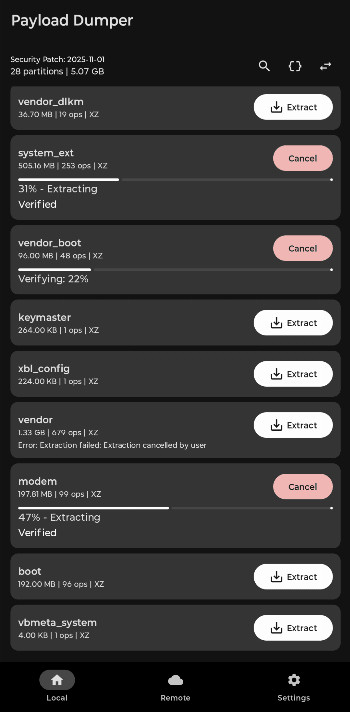
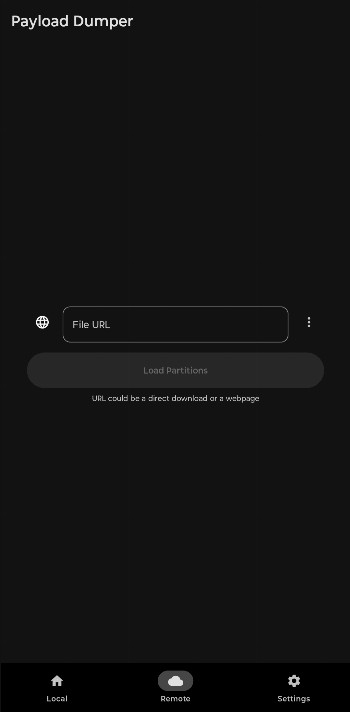
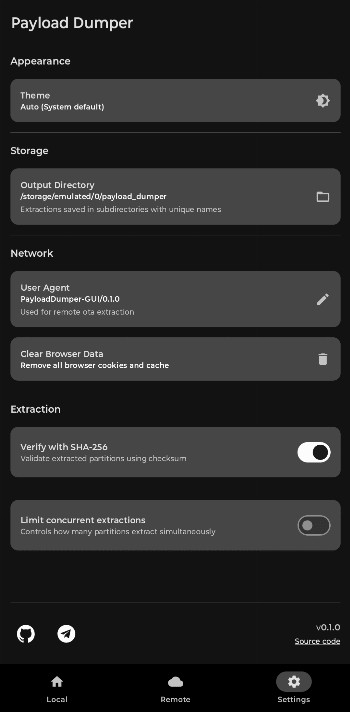
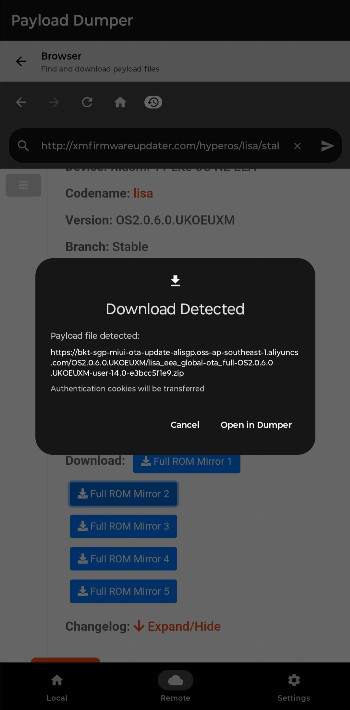
Payload Dumper GUI is a System tool by rhythmcache that extracts Android OTA payloads from local files or remote HTTP URLs. It is designed for users who need to pull specific partitions out of an OTA update package without unpacking the entire archive or downloading the full file when the source is online. The app works with both payload.bin files and OTA ZIP containers, and it is aimed at Android enthusiasts, developers, and advanced users who want to inspect or reuse system images. Because it is free and open source under the Apache-2.0 license, it offers a transparent way to handle firmware files. The interface is meant to be straightforward, so even someone new to OTA payloads can start extracting with minimal guidance. However, it does have some limitations, such as not supporting multi-extent or differential OTAs, and remote extraction requires the server to allow HTTP Range requests. For local files, you can select a payload.bin or an OTA ZIP directly from your device storage. For remote files, you can paste an HTTP URL, and the app will fetch only the parts it needs. This saves bandwidth and time, especially for large OTA packages. You can also extract several partitions at once and set a limit on concurrent extractions to manage CPU and I/O load. After extraction, the app verifies each partition with SHA-256 checksums to confirm data integrity. The app requires Android 7.0 or newer and is about 16 MB in size, so it is lightweight and runs on most modern devices. It is not intended for casual users who just want to update their phone; rather, it is a practical utility for those who tinker with custom ROMs, recoveries, or system images. The developer has kept the tool open source, inviting contributions and feedback, which suggests active maintenance and a community-driven approach. Overall, it is a focused, no-nonsense utility that does one job well, with a few caveats you should know before relying on it for critical tasks.
For beginners, the main thing to understand is that an OTA payload is a container used by Android to deliver system updates. This app lets you open that container and take out individual files, like the boot image or system partition, without needing a computer. You can also point it at a web address and extract directly from there, which is handy if you do not want to download a multi-gigabyte file. The app does not require root access, and it does not modify your device, so it is safe to try if you are curious. Just be aware that the extracted partitions are raw images, not installable apps, and you will need additional tools to flash or inspect them. The app is best used on a device with enough free storage for the partitions you extract, since some images can be large. The developer has kept the tool open source, inviting contributions and feedback, which suggests active maintenance and a community-driven approach. Overall, it is a focused, no-nonsense utility that does one job well, with a few caveats you should know before relying on it for critical tasks.
Key features
- Supports payload.bin and OTA ZIP files
- Extract specific partitions directly from remote HTTP OTA URLs without downloading the full OTA
- Extract multiple partitions simultaneously
- Cancel running extractions
- Optional limit on concurrent extractions to control CPU and I/O usage
- SHA-256 checksum verification for extracted partitions
How to install
- Tap the download button on this page to get the APK file, which is about 16 MB in size.
- When Android asks for permission, allow your browser or file manager to install apps by enabling the 'Install unknown apps' setting for that app.
- Open the downloaded APK file from your notifications or file manager.
- Tap Install on the confirmation screen and wait for the installation to finish.
- Open the app from your app drawer or home screen.
- Make sure your device runs Android 7.0 or newer, as that is the minimum required version.
Pros
- Free and open source under the Apache-2.0 license
- Can extract from remote URLs without downloading the whole OTA
- Supports parallel extraction and cancellation
- Includes SHA-256 verification for data integrity
- Lightweight at 16 MB and works on Android 7.0 and up
Cons
- Does not support multi-extent OTAs or differential OTAs
- Remote extraction requires the server to support HTTP Range requests
- Raw partitions may be large and consume significant storage
Version history
| Version | Size | Requires Android | Updated |
|---|---|---|---|
| 0.1.3 | 16 MB | 7.0 | Feb 15, 2026 |
| 0.1.2 | 16 MB | 7.0 | Dec 31, 2025 |
This app is for Android enthusiasts, developers, and advanced users who need to extract specific partitions from OTA payloads, whether stored locally or hosted online, and prefer a free, open-source tool without a steep learning curve.
If you are extracting from a remote URL, make sure the server supports HTTP Range requests; otherwise, the extraction will fail. Also, set a low limit on concurrent extractions if your device feels sluggish, and always verify the SHA-256 checksums after extraction to ensure the partitions are intact.
Frequently asked questions
Is Payload Dumper GUI free to use?
Yes, the app is free. It is also open source under the Apache-2.0 license.
Which Android version do I need?
The app requires Android 7.0 or higher. Its current version is 0.1.3, released on 2026-02-15.
What is the app's file size?
The installation file is about 16 MB. This size may vary slightly depending on your device.
Do I need an account to use it?
No, no account or login is required. You can extract OTA payloads from local files or remote HTTP URLs right away.
What permissions does the app request?
The app does not list any special permissions in its feature set. It works with local files and HTTP URLs you provide.
How do I update the app?
To update, simply download the newest version from this page and install it over the existing one. The latest release is 0.1.3.
Payload Dumper GUI is a practical, lightweight utility that simplifies extracting Android OTA partitions, especially from remote sources. While it has some limitations, its free, open-source nature and straightforward interface make it a solid choice for anyone who needs to work with OTA payloads on a mobile device.
Similar apps


Updated: Nov 6, 2026
| Version | Size | Requires Android | Updated |
|---|---|---|---|
| 0.1.3 | 16 MB | 7.0 | Feb 15, 2026 |
| 0.1.2 | 16 MB | 7.0 | Dec 31, 2025 |
- Version
- 0.1.3
- Size
- 16 MB
- Requires Android
- 7.0
- Updated
- Feb 15, 2026
- Category
- Tools
- Developer
- rhythmcache
- Package
- com.rhythmcache.payloaddumper
- Free
- ✓